AMUD Dashboard vs Heimdall vs Homepage vs Homarr (I'll Be Honest)
I built AMUD Dashboard so I'm biased. Here's when you'd still pick something else.
Read article →I built AMUD. I'm biased. Here's the honest comparison anyway.
Homelab notes from building AMUD Dashboard — Rust, Proxmox, zero YAML, and way too much SQLite. Written by Youssef Boubli.
I built AMUD Dashboard so I'm biased. Here's when you'd still pick something else.
Read article →I built AMUD. I'm biased. Here's the honest comparison anyway.
If your CPU graphs freeze at 0%, your reverse proxy probably isn't forwarding WebSocket upgrades. Fix inside.
Read article →Deployed AMUD Dashboard behind Nginx, opened the page, everything looked fine except the CPU bar was stuck at 0% like the server was dead. Server wasn't dead. Nginx just ate the WebSocket upgrade.
Argon2id passwords, encrypted integration secrets, CSRF, rate limiting — what AMUD Dashboard actually ships with.
Read article →Your dashboard is a map to your entire homelab. Treat it like one.
Copy-paste CSS from the theme gallery. Dracula, Nord, Catppuccin, Cyberpunk Neon, and eight more with preview screenshots.
Read article →The default AMUD Dashboard look is orange glass. I like it. My partner said it looked like a Cheetos-themed spaceship cockpit. Fair.
Name your app card Home Assistant, drop in a long-lived token, get lights/switches/temp on the card.
Read article →I had a Home Assistant card that was literally just a URL. Useful, but my wall tablet deserved better.
AMUD Dashboard polls /Sessions and /status/sessions in the background. Your media cards show live stream titles.
Read article →"Is anyone watching something right now or can I restart the container?"
Two containers, one shared socket volume, AMUD_DOCKER=1 on the agent. Not Proxmox-native but still lean.
Read article →Not everyone runs Proxmox. Some of you are Docker-all-the-way-down and that's fine.
Link an app card to a CTID, get live RUNNING/STOPPED status, and optionally power-cycle containers without opening Proxmox.
Read article →A link list tells you where Jellyfin should be. It doesn't tell you Jellyfin is stopped because you updated the LXC last night and forgot to bring it back up.
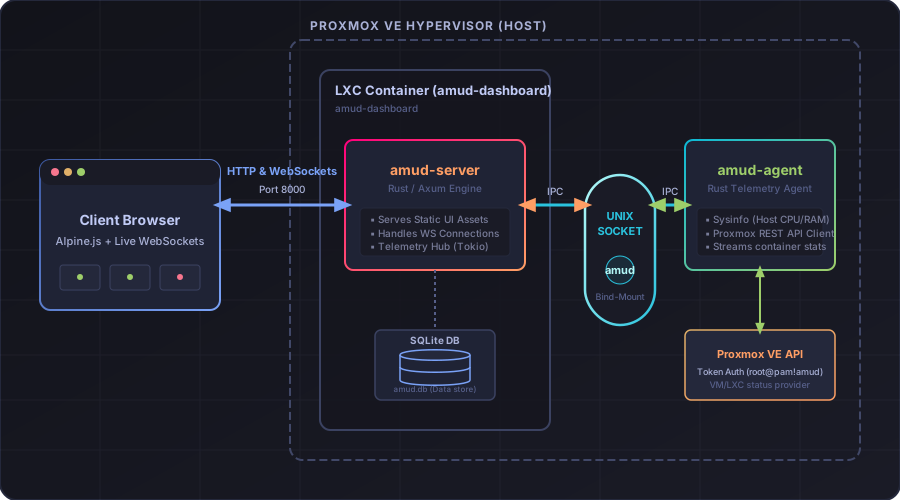
Most dashboards shell out to pvesh or docker stats every few seconds. AMUD Dashboard reads /proc and talks to APIs natively in Rust.
Read article →Here's a pattern I've seen in a lot of homelab monitoring glue:
AMUD Dashboard stores your whole dashboard in amud.db. Edit in the browser, backup one file, never debug YAML indentation again.
Read article →I lost a Saturday to a YAML space.
One curl on your Proxmox host provisions an LXC, installs the agent on the hypervisor, and gives you a working dashboard on port 8000.
Read article →Docker is fine. I use it. But wrapping a dashboard — a thing that mostly displays links and polls metrics — inside another network stack on a Proxmox box always felt like wearing two coats indoors.

AMUD Dashboard started because my bookmark portal was eating 150MB of RAM and I was tired of YAML. Here's what I built instead.
Read article →My homelab had the usual problem: twenty services, zero good way to open them.
I tried the usual suspects. Heimdall looked nice until I checked htop and saw PHP-FPM doing absolutely nothing useful while holding ~150MB. Homepage was closer to what I wanted — live widgets, clean UI — but I spent an entire Sunday debugging a YAML indent before I admitted I hate editing config files on disk for something as dumb as "add Jellyfin link."
So I did what any reasonable person with too much free time does: I wrote another dashboard.