Real-Time Homelab Telemetry Without Spawning Shell Scripts
Most dashboards shell out to pvesh or docker stats every few seconds. AMUD Dashboard reads /proc and talks to APIs natively in Rust.
Here's a pattern I've seen in a lot of homelab monitoring glue:
while true; do
  pvesh get /nodes/$(hostname)/lxc --output-format json
  sleep 5
done
It works until you realize you're forking a process every five seconds for a dashboard that sits on a wall tablet 99% of the time. On a busy host that's just noise.
What AMUD Dashboard does instead
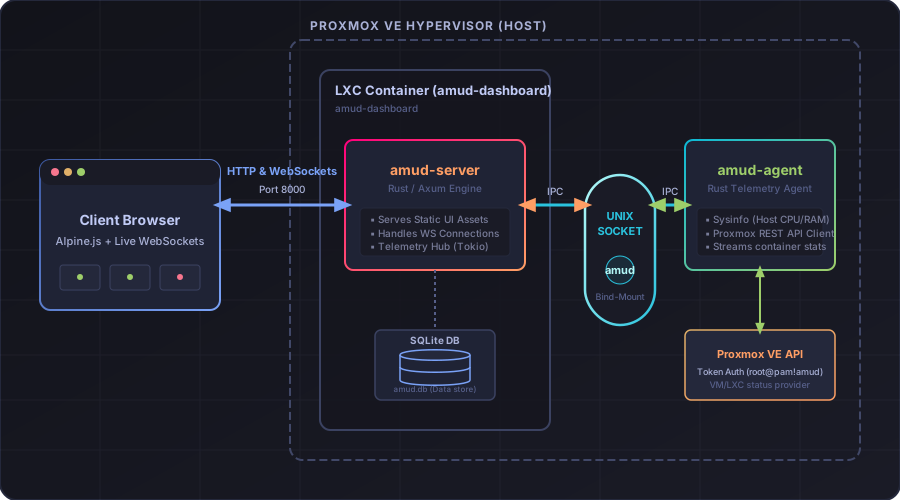
amud-agent reads host metrics straight from /proc and /sys. No subprocess. For Proxmox it uses native HTTPS to the PVE API on port 8006 (hyper + rustls). For Docker it reads the daemon over the Unix socket (hyperlocal) — no docker stats CLI.
Data goes to amud-server over a Unix domain socket (TCP fallback on Windows). Server serializes once per poll tick and fans out to browsers via WebSockets using a tokio::sync::watch channel.
Result: CPU/RAM/disk bars actually move smoothly. The UI doesn't stutter when you've got twenty containers.
Agent auth isn't an afterthought
Random processes can't connect and inject fake "everything is fine" metrics. The agent does challenge-response with AMUD_AGENT_SECRET before the server accepts payloads.
Architecture deep dive: /docs/ARCHITECTURE
What you see
- Host CPU, RAM, disk, network — live
- Per-app RUNNING/STOPPED when linked to CTID or Docker name
- Integration badges (Plex streams, HA stats, etc.) polled on Tokio green threads alongside everything else
If your graphs are frozen at 0%, you're probably behind a reverse proxy that isn't forwarding WebSocket upgrades. Fix that before blaming the agent.
More on that in a later post.