Introduction
AMUD (Advanced Modern Unified Dashboard) is a compiled, zero-dependency homelab control center and telemetry dashboard.
Unlike legacy dashboards (Heimdall, Homepage, Homarr) that run on heavy runtimes (PHP-FPM, Node.js) and rely on complex nested YAML configuration files, AMUD Dashboard is written in compiled Rust and persisted entirely in SQLite. Combined, the server and telemetry agent idle at 30–50 MB of RAM (peak ~150 MB with a full integration grid) with sub-millisecond route execution.
System Architecture
AMUD uses a decoupled client-server architecture to aggregate metrics and report container status in real-time.
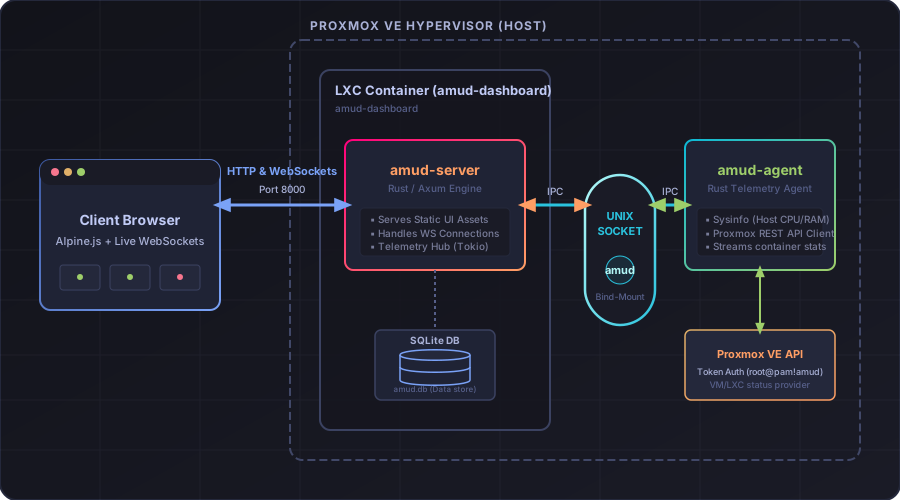
amud-server: Axum-based web server that serves server-rendered HTML (via Alpine.js templates) and manages persistent state in SQLite.amud-agent: Standalone daemon on each homelab host (one or many). It queries host metrics, Proxmox VE containers, and Docker runtimes, streaming JSON to the server via UDS (amud.sock) locally or TCP/TLS remotely. See Multi-node agents.
Key Design Principles
1. Minimal Resource Overhead
- Native Compilation: No PHP-FPM, JVM, or Node.js runtime environment is required. The binary compiles to native machine code to eliminate JVM/V8 startup and heap overhead.
- Tokio background telemetry loops: Polling loops for system metrics and integrations (AdGuard, Pi-hole, Plex, Home Assistant) run concurrently on Tokio green threads. Live updates are pushed to WebSockets using a
tokio::sync::watchchannel.
2. Zero-YAML Configuration
- SQLite Persistence: Configuration is stored in an embedded SQLite database (configured in WAL mode for concurrent reads). Layouts, category tabs, and settings are configured directly via the UI, bypassing YAML syntax headaches.
3. Direct Telemetry Collection
- Zero Shell Subprocesses:
amud-agentqueries the Proxmox VE REST API natively usinghyperandrustlsfor HTTPS requests, and reads the Docker daemon directly over the UNIX socket viahyperlocal. It avoids spawning heavy system call forks likepveshorcurl.
4. Admin vs. Guest Profiles
- Cryptographic Roles: built-in user roles. Admins see the full cluster control array; guests or family profiles get a clean, read-only dashboard layout out of the box.
What AMUD includes
See the full Features page for every shipped capability — Proxmox/Docker telemetry, Jellyfin/Plex streams, Pi-hole and *arr integrations, RSS feeds, webhooks, Wake-on-LAN, 41 themes, audit log, and more.
Next Steps
- Features — complete feature inventory (1.9.3)
- FAQ — common questions (install, RAM, YAML, comparisons)
- Blog — guides and homelab notes (canonical source for cross-posts)
- Dashboard Configuration — appearance, custom CSS, smart home, and media integrations
- Security — Argon2id passwords, sessions, rate limits, HTTPS cookies
- Troubleshooting — upgrades, IPC auth, database backups, and CSS resets